Layer2 vs Layer3
Una UDN primaria può avere due topologie. Importante: non sono VLAN. Sono entrambe overlay OVN (incapsulamento Geneve), non toccano vSphere né la rete fisica.
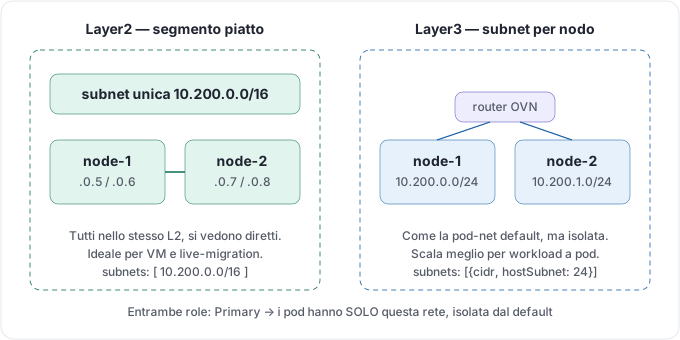
Layer2 — segmento piatto
Sezione intitolata “Layer2 — segmento piatto”Un unico segmento L2 su tutti i nodi: stessa subnet ovunque (es. 10.200.0.0/16 valida su qualsiasi nodo). I pod si vedono direttamente, come in un open-space.
cat <<'EOF' | oc apply -f -apiVersion: k8s.ovn.org/v1kind: UserDefinedNetworkmetadata: name: primary-net namespace: tenant-segregatospec: topology: Layer2 layer2: role: Primary subnets: - 10.200.0.0/16EOFQuando: VM (live-migration, IP stabile), app che vogliono stare nella stessa subnet, semplicità.
Layer3 — subnet per nodo
Sezione intitolata “Layer3 — subnet per nodo”Ogni nodo riceve una fetta della subnet (hostSubnet) e OVN fa il routing fra i nodi. È lo stesso schema della pod-network di default, ma isolato.
cat <<'EOF' | oc apply -f -apiVersion: k8s.ovn.org/v1kind: UserDefinedNetworkmetadata: name: primary-net namespace: tenant-segregatospec: topology: Layer3 layer3: role: Primary subnets: - cidr: 10.200.0.0/16 hostSubnet: 24EOFQuando: workload a pod (non VM), scalabilità su molti nodi. È la scelta naturale se hai pod e non macchine virtuali.
Come scegliere
Sezione intitolata “Come scegliere”| Layer2 | Layer3 | |
|---|---|---|
| Struttura | Segmento piatto unico | Subnet per nodo + routing |
| Modello mentale | Open-space | Stanze collegate da router |
| IP che “segue” il workload | Sì (ottimo per VM) | No |
| Scala su molti nodi | Buona | Migliore |
| Caso tipico | VM / OpenShift Virtualization | Pod |